JotDown
AI-Powered Smart Notes with Semantic Search and Category Visualization
UXD
Sr UX Designer
Dev + Design
JotDown
AI-Powered Smart Notes with Semantic Search and Category Visualization
UXD
Sr UX Designer
Dev + Design

TIMELINE
TIMELINE
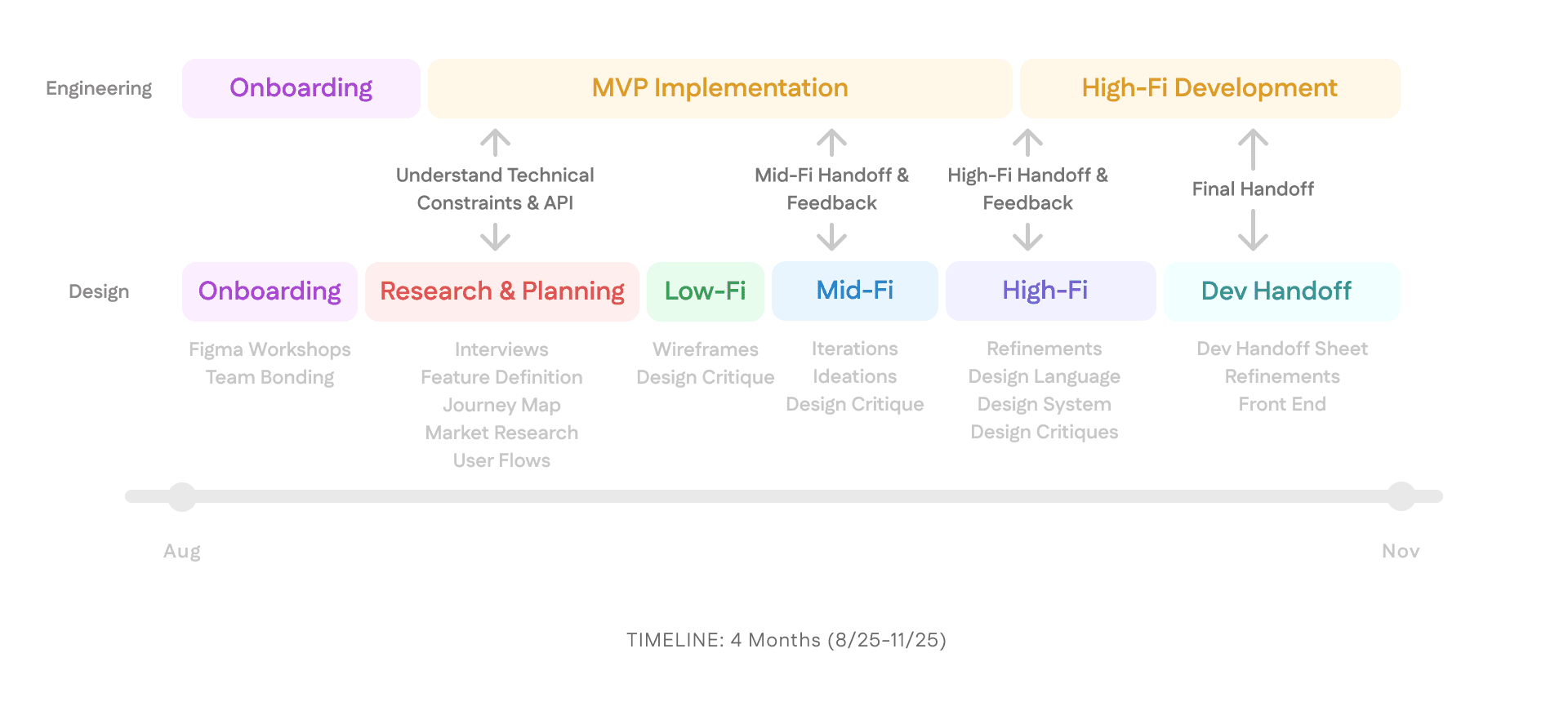
3 months
Aug 2025 - Present
3 months
Aug 2025 - Present
3 months
Aug 2025 - Present
MY ROLE
MY ROLE
Senior UX Designer
of iOS Club
Senior UX Designer
of iOS Club
Senior UX Designer
of iOS Club
TEAM
TEAM
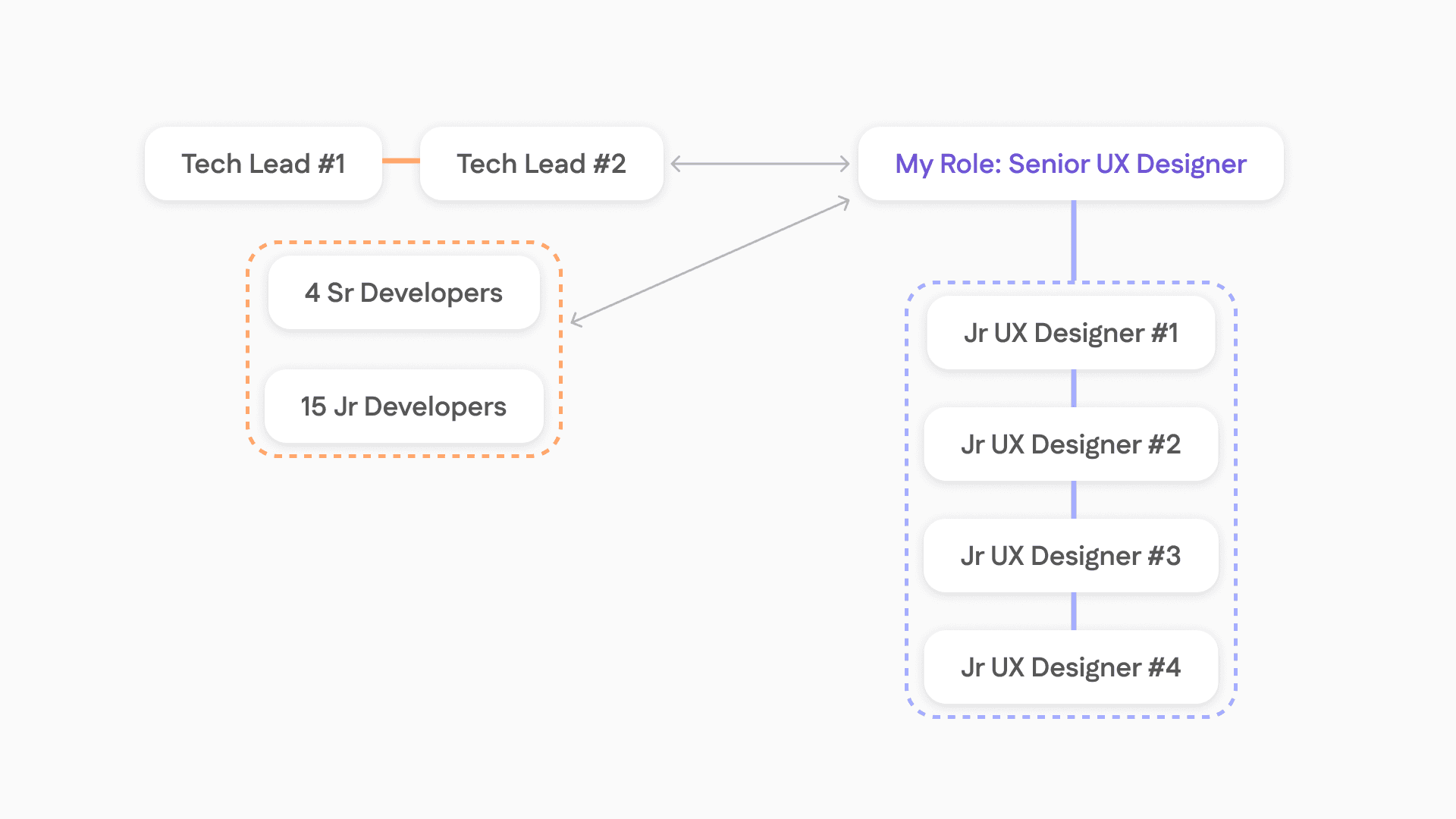
1 Sr UX Designer
4 Jr UX Designers
2 Tech Leads
3 Sr Developers
15 Jr Developers
1 Sr UX Designer
4 Jr UX Designers
2 Tech Leads
3 Sr Developers
15 Jr Developers
1 Sr UX Designer
4 Jr UX Designers
2 Tech Leads
3 Sr Developers
15 Jr Developers
TOOLS
TOOLS
Figma
XCode
Icon Composer
SF Symbols
Figma
XCode
Icon Composer
SF Symbols
Figma
XCode
Icon Composer
SF Symbols
The Project
The Project
JotDown is a project of GT iOS Club where designers and developers collaborate closely to produce. It's an AI-Powered Smart Notes App with Semantic Search and Category Visualization.
I led a team of 4 junior designers: from a project roadmap, research & brainstorming, lo-fi, mid-fi, high-fi, ideations, design critiques, and dev handoffs.
JotDown is a project of GT iOS Club where designers and developers collaborate closely to produce. It's an AI-Powered Smart Notes App with Semantic Search and Category Visualization.
I led a team of 4 junior designers: from a project roadmap, research & brainstorming, lo-fi, mid-fi, high-fi, ideations, design critiques, and dev handoffs.
JotDown is a project of GT iOS Club where designers and developers collaborate closely to produce. It's an AI-Powered Smart Notes App with Semantic Search and Category Visualization.
I led a team of 4 junior designers: from a project roadmap, research & brainstorming, lo-fi, mid-fi, high-fi, ideations, design critiques, and dev handoffs.
The Problem:
The Problem:
The Problem:
Users don’t struggle to take notes, they struggle to find it again & make meaning of it.
Users don’t struggle to take notes, they struggle to find it again & make meaning of it.
Users don’t struggle to take notes, they struggle to find it again & make meaning of it.
The Outcome:
The Outcome:
The Outcome:
AI-Powered Smart Notes App with Semantic Search and Category Visualization.
1st Place in Popular App - Crowd Fav 🏆
AI-Powered Smart Notes App with Semantic Search and Category Visualization.
1st Place in Popular App - Crowd Fav 🏆
AI-Powered Smart Notes App with Semantic Search and Category Visualization.
1st Place in Popular App - Crowd Fav 🏆
My Role: Senior UX Designer of iOS Club
My Role: Senior UX Designer of iOS Club
My Role:
Senior UX Designer of iOS Club
I led 4 Junior UX Designers to design & collaborate with 20 Developers.
I led 4 Junior UX Designers to design & collaborate with 20 Developers.
I led 4 Junior UX Designers to design & collaborate with 20 Developers.
My Role & Teamwork
My Role & Teamwork
My Role & Teamwork
Final Features
Final Features
How can we support contextualized search & visualization?
How can we support contextualized search & visualization?
How can we support contextualized search & visualization?

Onboarding
Onboarding
Understand the user to personalize categories
Understand the user to personalize categories
Understand the user to personalize categories

Note Jotting
Note Jotting
Easily write notes with little friction
Easily write notes with little friction
Easily write notes with little friction

AI Semantic Search
AI Semantic Search
Use AI-powered semantic search to search with context
Use AI-powered semantic search to search with context
Use AI-powered semantic search to search with context

AI Categorization
AI Categorization
Smart categories making it easier to look at past notes
Smart categories making it easier to look at past notes
Smart categories making it easier to look at past notes

Visualization
Visualization
“It’d be nice to see my notes being organized or mapped out with my thinking”
“It’d be nice to see my notes being organized or mapped out with my thinking”
“It’d be nice to see my notes being organized or mapped out with my thinking”
The Problem Space
The Problem Space
The Problem Space
8 Users Live Interviewed
8 Users Live Interviewed
8 Users Live Interviewed
Users search by context or topics, not exact phrases
Users search by context or topics, not exact phrases
Users search by context or topics, not exact phrases
Visual presentation improves organization
Visual presentation improves organization
Visual presentation improves organization
Who?
Who?
Who?
College Students in the US
College Students in the US
College Students in the US
7/8
7/8
7/8
(87.5%)
(87.5%)
(87.5%)
of Users said they have trouble finding past notes
of Users said they have trouble finding past notes
of Users said they have trouble finding past notes
“I can’t remember the exact words I wrote”
“I can’t remember the exact words I wrote”
“I have notes in Notion, notes app, Google Docs, and even in Messages.”
“I have notes in Notion, notes app, Google Docs, and even in Messages.”
“It’d be nice to see my notes being organized or mapped out with my thinking”
“It’d be nice to see my notes being organized or mapped out with my thinking”
“It’s annoying to manually organize”
“It’s annoying to manually organize”
Research + Planning
Research + Planning
Research + Planning
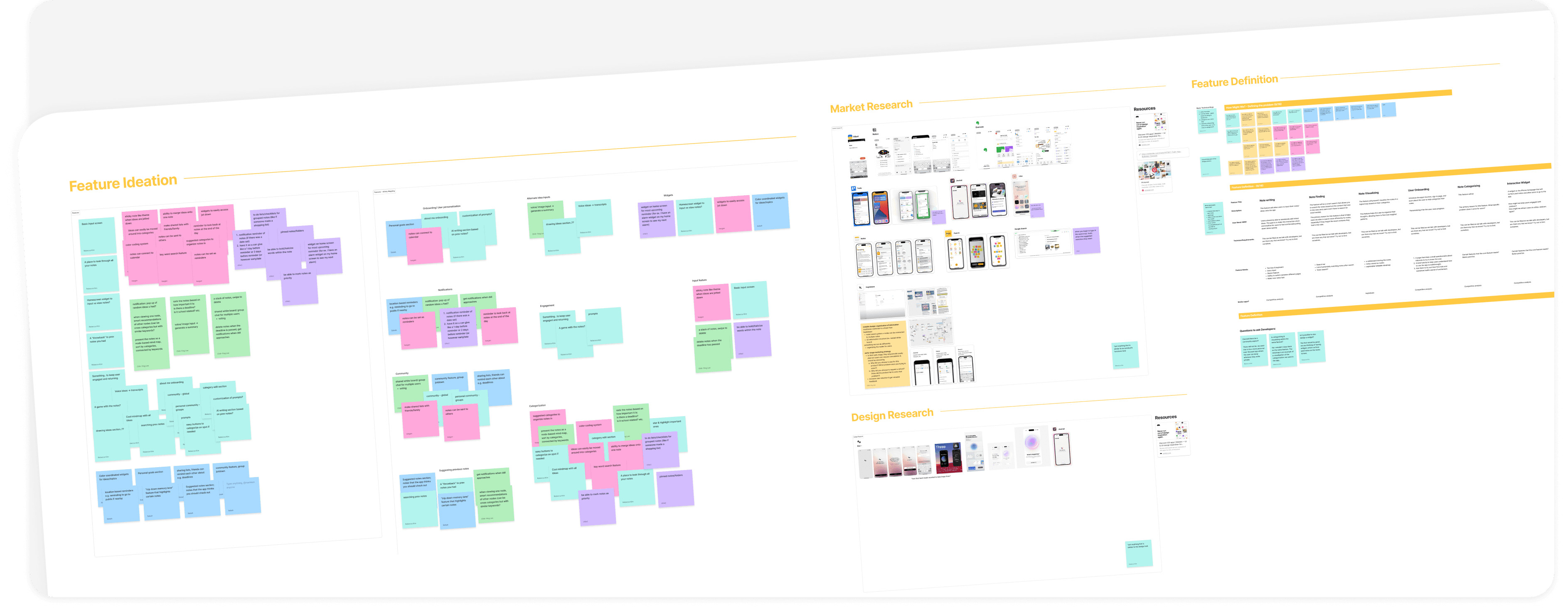
Interviews
Feature Ideation
Affinity Mapping
Market Research
Design Research
Interviews
Feature Ideation
Affinity Mapping
Market Research
Design Research
Interviews
Feature Ideation
Affinity Mapping
Market Research
Design Research
User Journey
How Might We?
Feature Definition
User Flows
Questions for Engineering
User Journey
How Might We?
Feature Definition
User Flows
Questions for Engineering
User Journey
How Might We?
Feature Definition
User Flows
Questions for Engineering
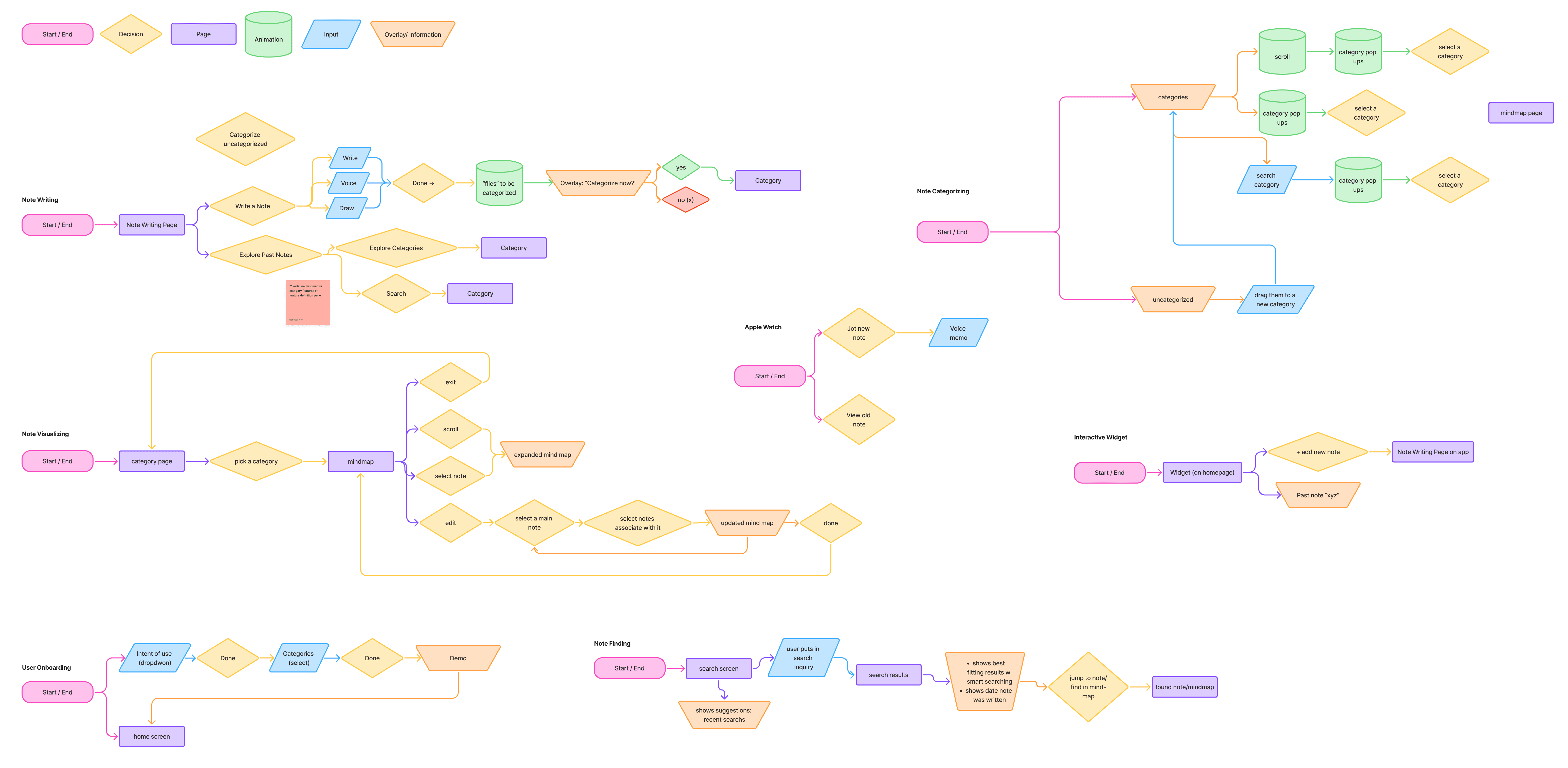
User Flows
User Flows
User Flows
UX Heuristic Law #6:
Recognition rather than Recall
UX Heuristic Law #6:
Recognition rather than Recall
UX Heuristic Law #6:
Recognition rather than Recall
“Minimize the user's memory load by making elements, actions, and options visible”
“Minimize the user's memory load by making elements, actions, and options visible”
“Minimize the user's memory load by making elements, actions, and options visible”
Visualize & Allow Natural Language
Visualize & Allow Natural Language
Visualize & Allow Natural Language
“Let people recognize information in the interface, rather than forcing them to remember (“recall”) it”
“Let people recognize information in the interface, rather than forcing them to remember (“recall”) it”
“Let people recognize information in the interface, rather than forcing them to remember (“recall”) it”

Recognizing context instead of having to recall specific words
Recognizing context instead of having to recall specific words
Recognizing context instead of having to recall specific words

Visualizing categories to help see related notes
Visualizing categories to help see related notes
Visualizing categories to help see related notes
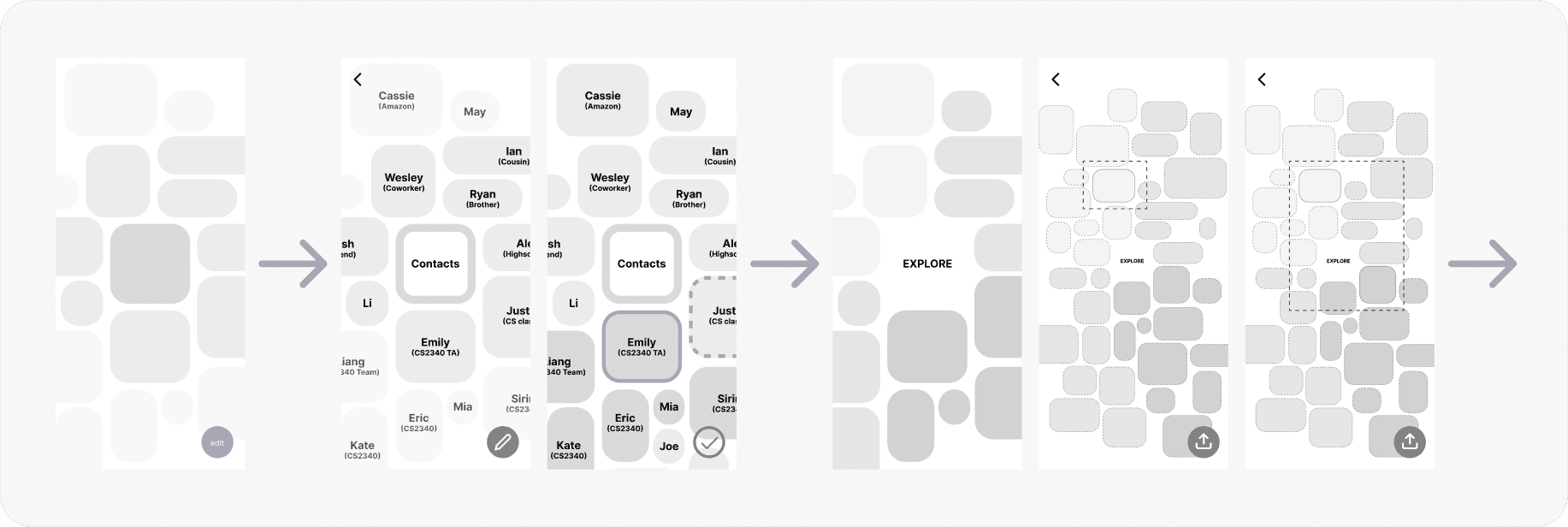
Feature Definitions + Low Fidelity
Feature Definitions + Low Fidelity
Onboarding
Onboarding
Onboarding
Understand user's likely categories to personalize
Understand user's likely categories to personalize
Understand user's likely categories to personalize
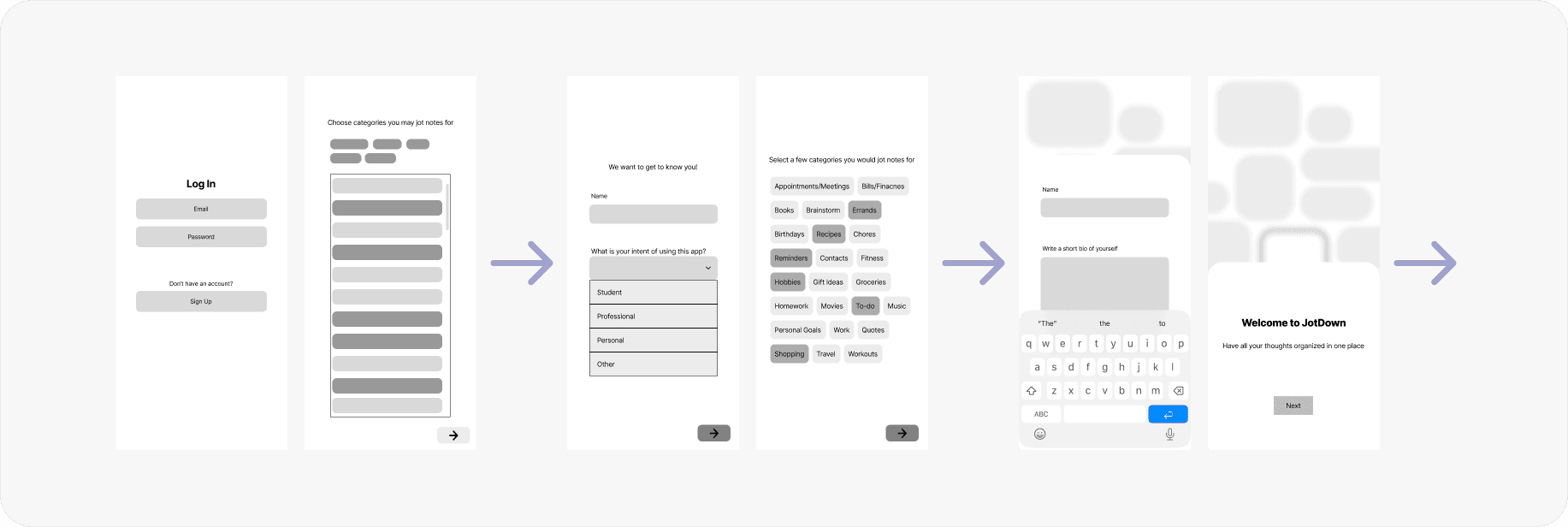
Note Jotting
Note Jotting
Note Jotting
Easily write notes as thoughts come up
Easily write notes as thoughts come up
Easily write notes as thoughts come up
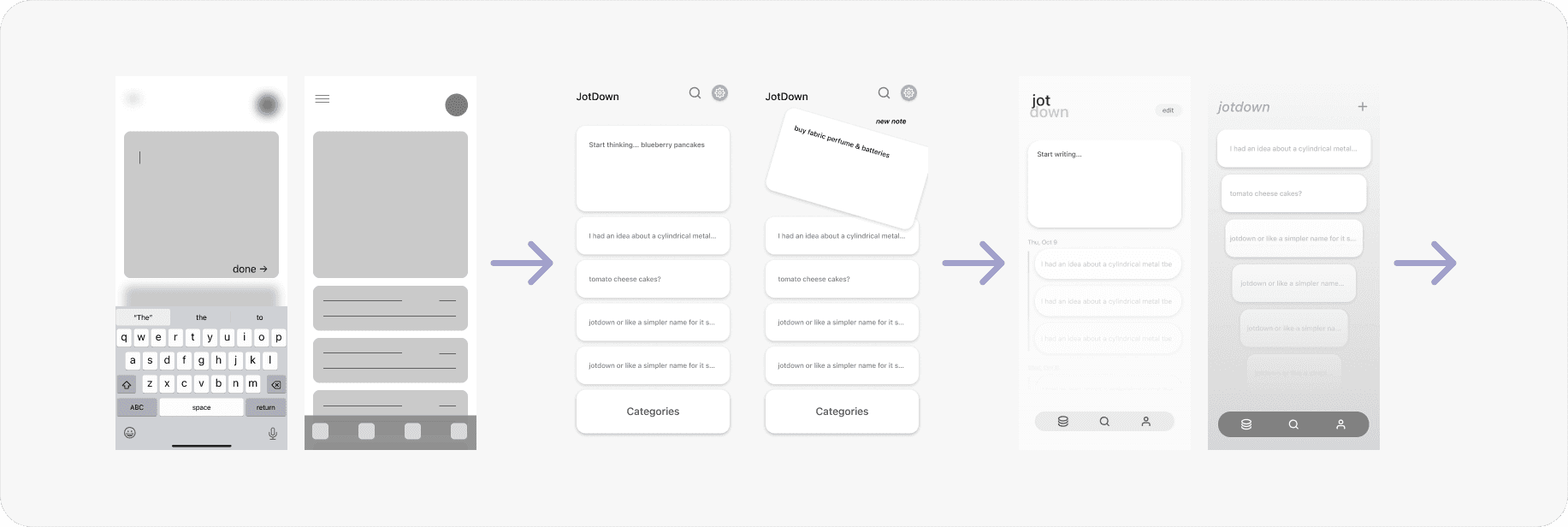
AI Semantic Search
AI Semantic Search
AI Semantic Search
Context-based search for past notes
Context-based search for past notes
Context-based search for past notes
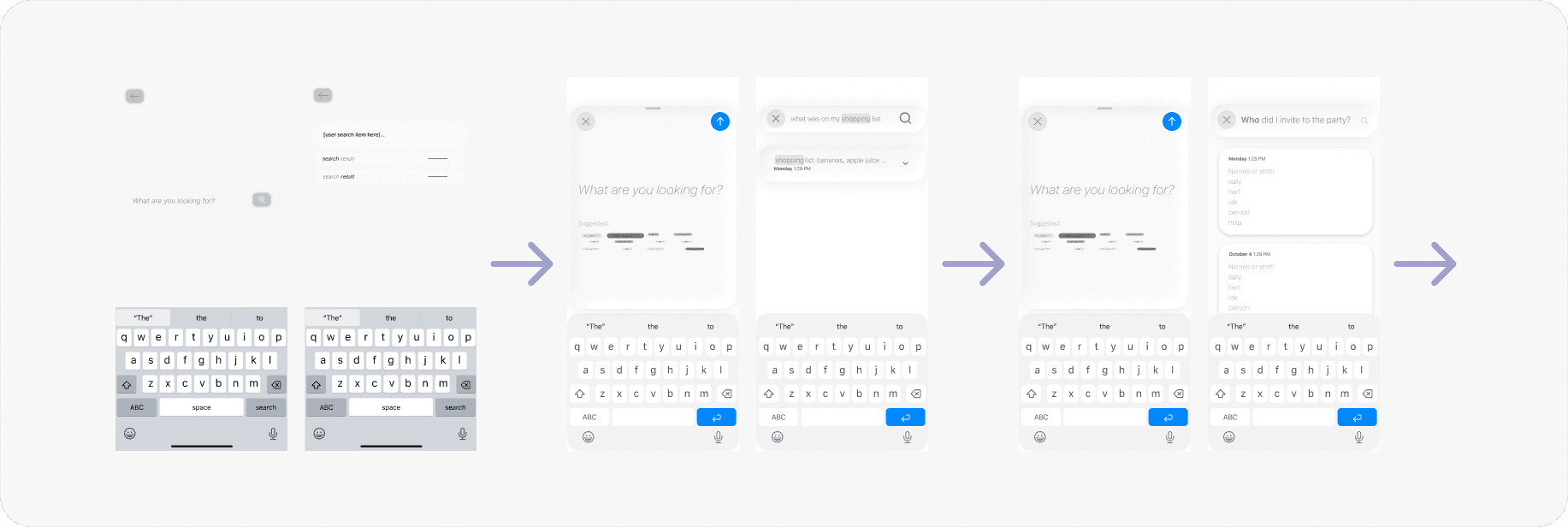
AI Categorization
AI Categorization
AI Categorization
Categorize based on onboarding + ability to override categories because AI may not always be right
Categorize based on onboarding + ability to override categories because AI may not always be right
Categorize based on onboarding + ability to override categories because AI may not always be right
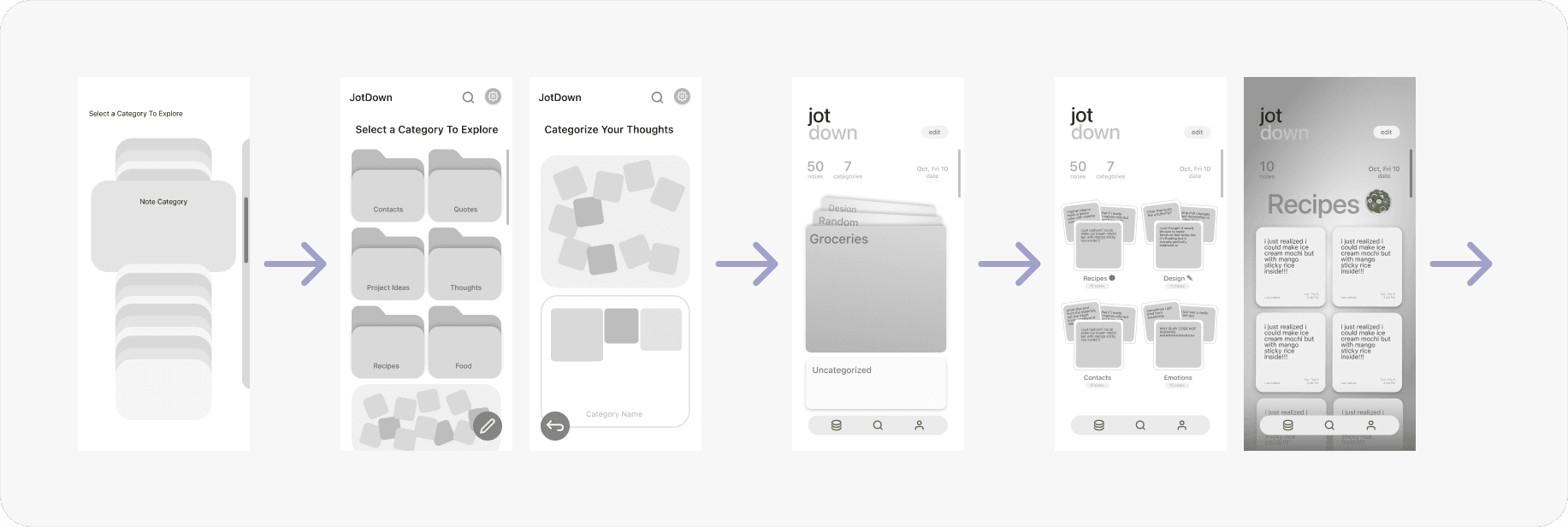
Visualization
Visualization
Visualization
Visualize notes in categories + share to others
Visualize notes in categories + share to others
Visualize notes in categories + share to others
Tradeoffs (Note Jotting)
Tradeoffs (Note Jotting)
Tradeoffs (Note Jotting)
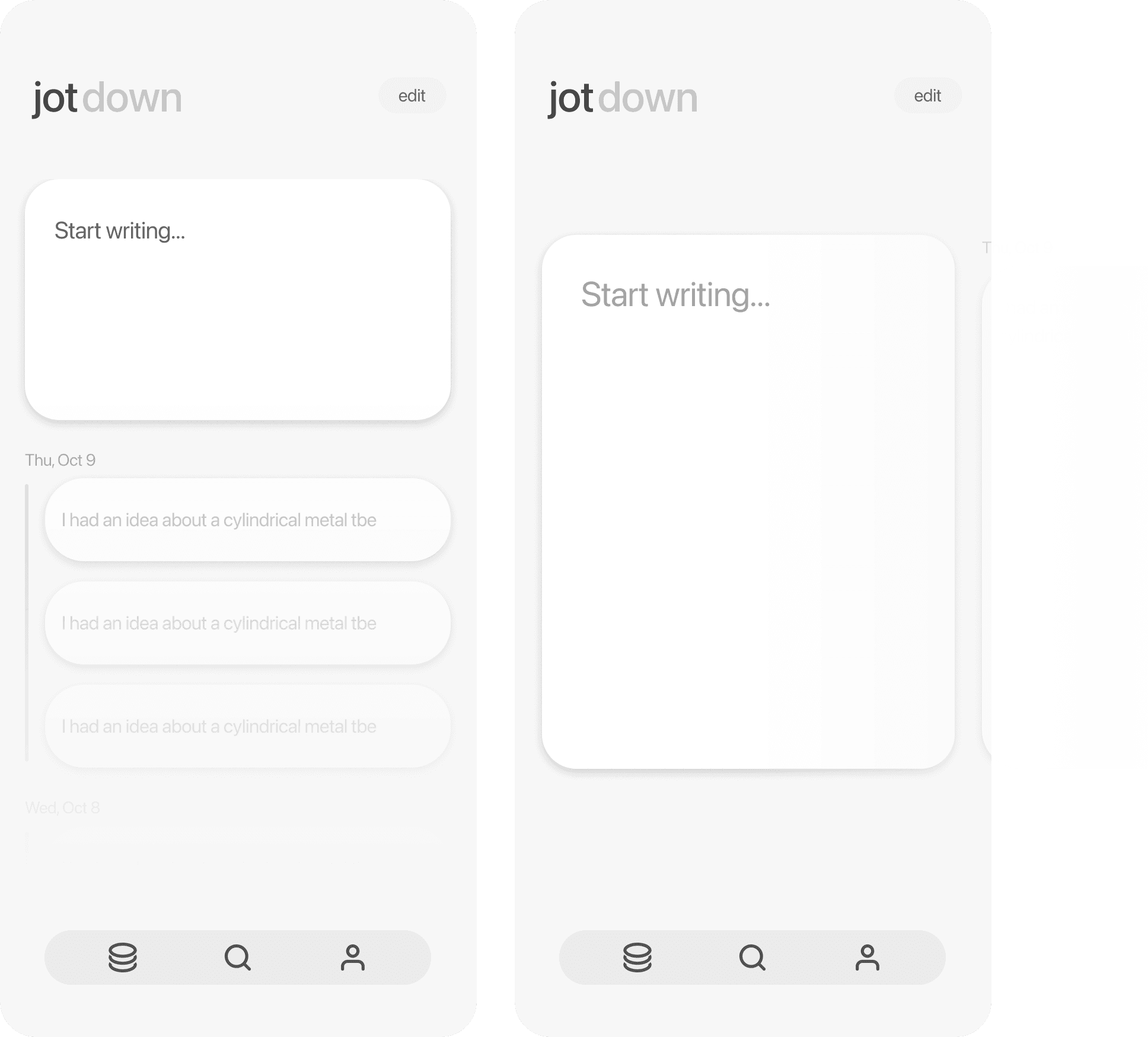
Why did we make certain design choices over another?
Vertical vs Horizontal Scroll?
Vertical vs Horizontal Scroll?
Vertical vs Horizontal Scroll?
In a user test, users preferred the horizontal scroll as it emphasized the purpose of this screen - to take notes, not browsing past ones.
In a user test, users preferred the horizontal scroll as it emphasized the purpose of this screen - to take notes, not browsing past ones.
In a user test, users preferred the horizontal scroll as it emphasized the purpose of this screen - to take notes, not browsing past ones.
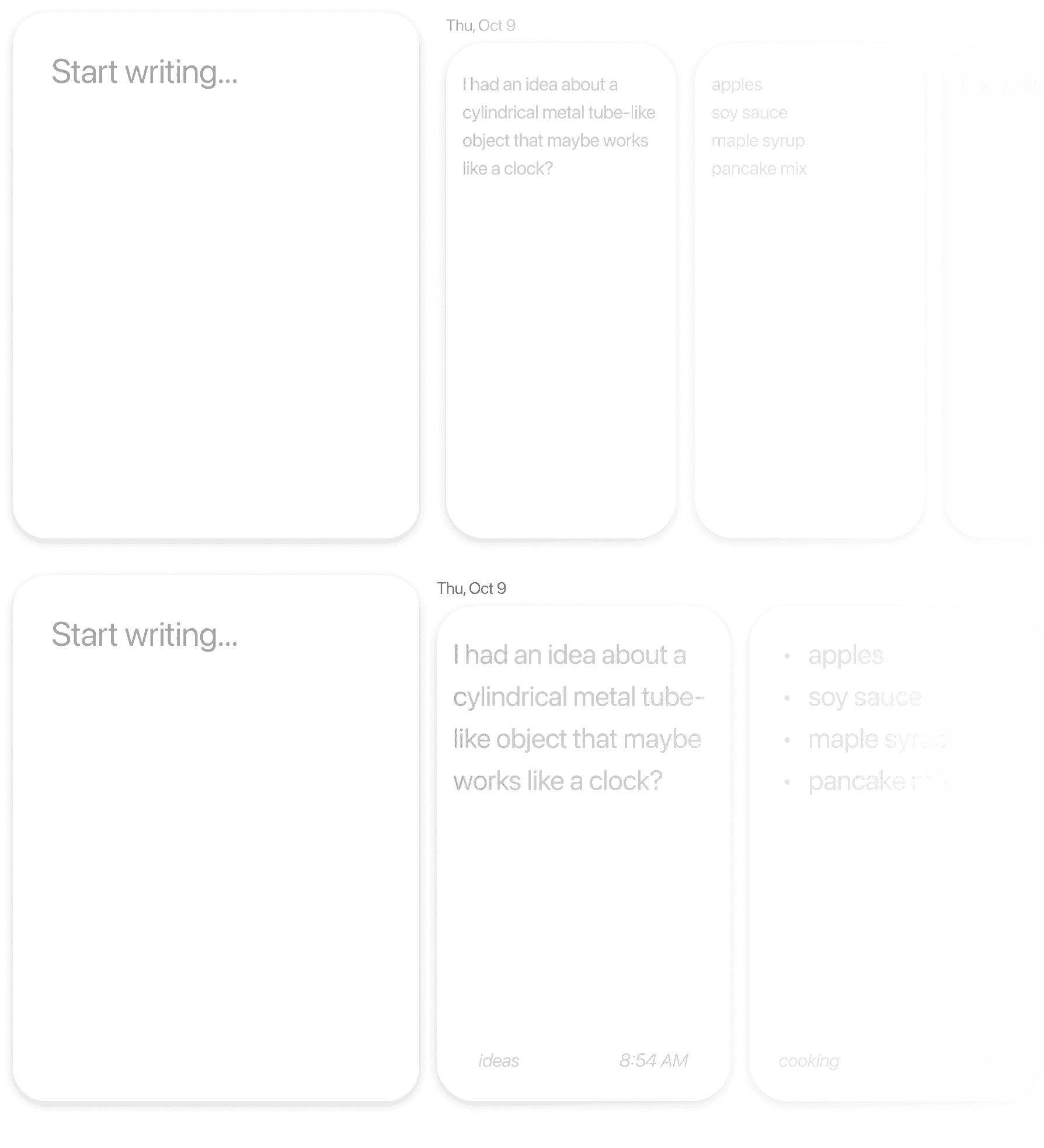
Smaller vs Larger History?
Smaller vs Larger History?
Smaller vs Larger History?
Larger notes were preferred because notes that are "jotted down" tend to be short, therefore it can be in large text.
Larger notes were preferred because notes that are "jotted down" tend to be short, therefore it can be in large text.
Larger notes were preferred because notes that are "jotted down" tend to be short, therefore it can be in large text.
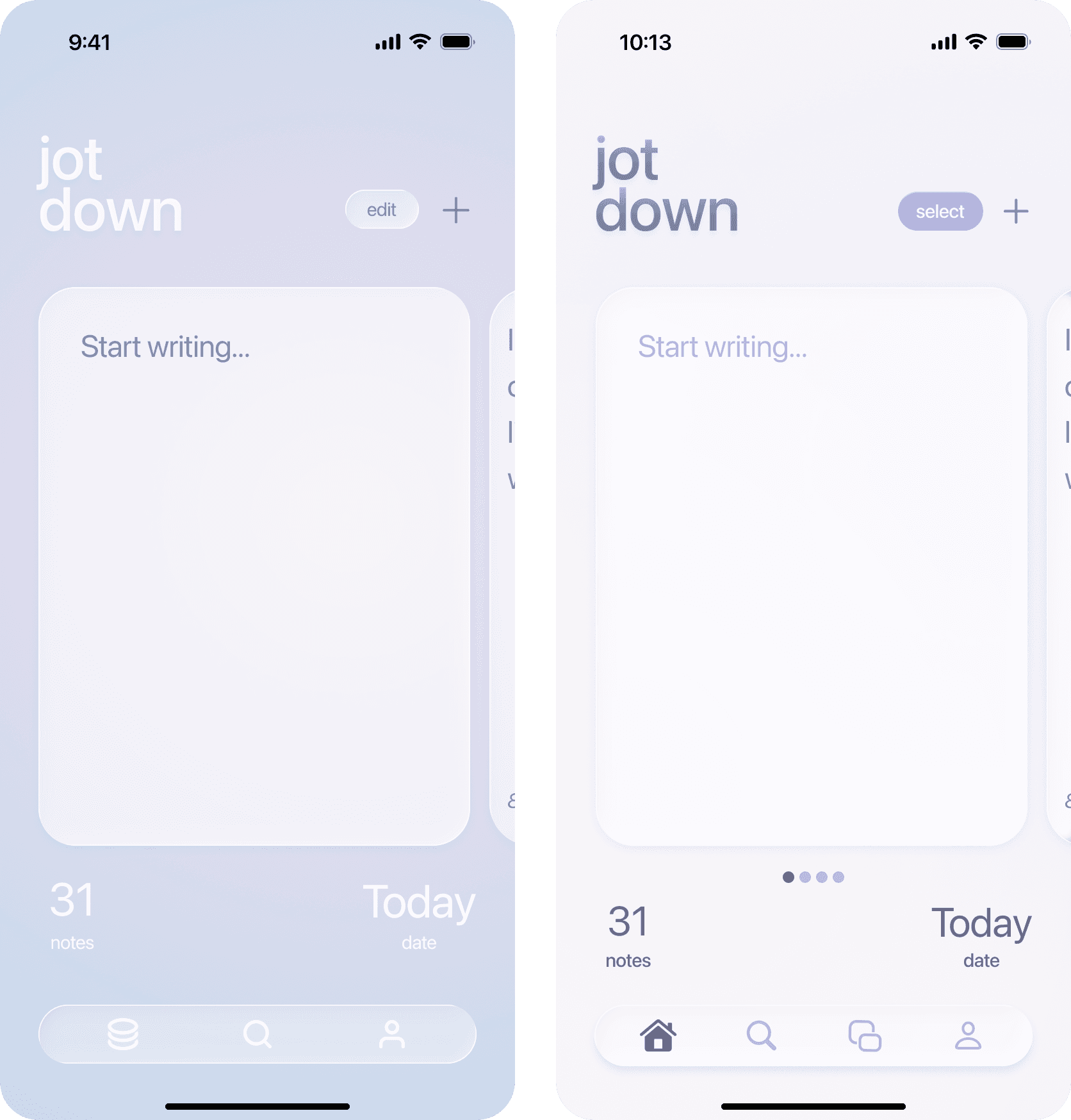
Darker vs Light w/ Higher Contrast?
Darker vs Light w/ Higher Contrast?
Darker vs Light w/ Higher Contrast?
Users preferred light with higher contrast due to better visibility.
Users preferred light with higher contrast due to better visibility.
Users preferred light with higher contrast due to better visibility.
Note Jotting
Note Jotting
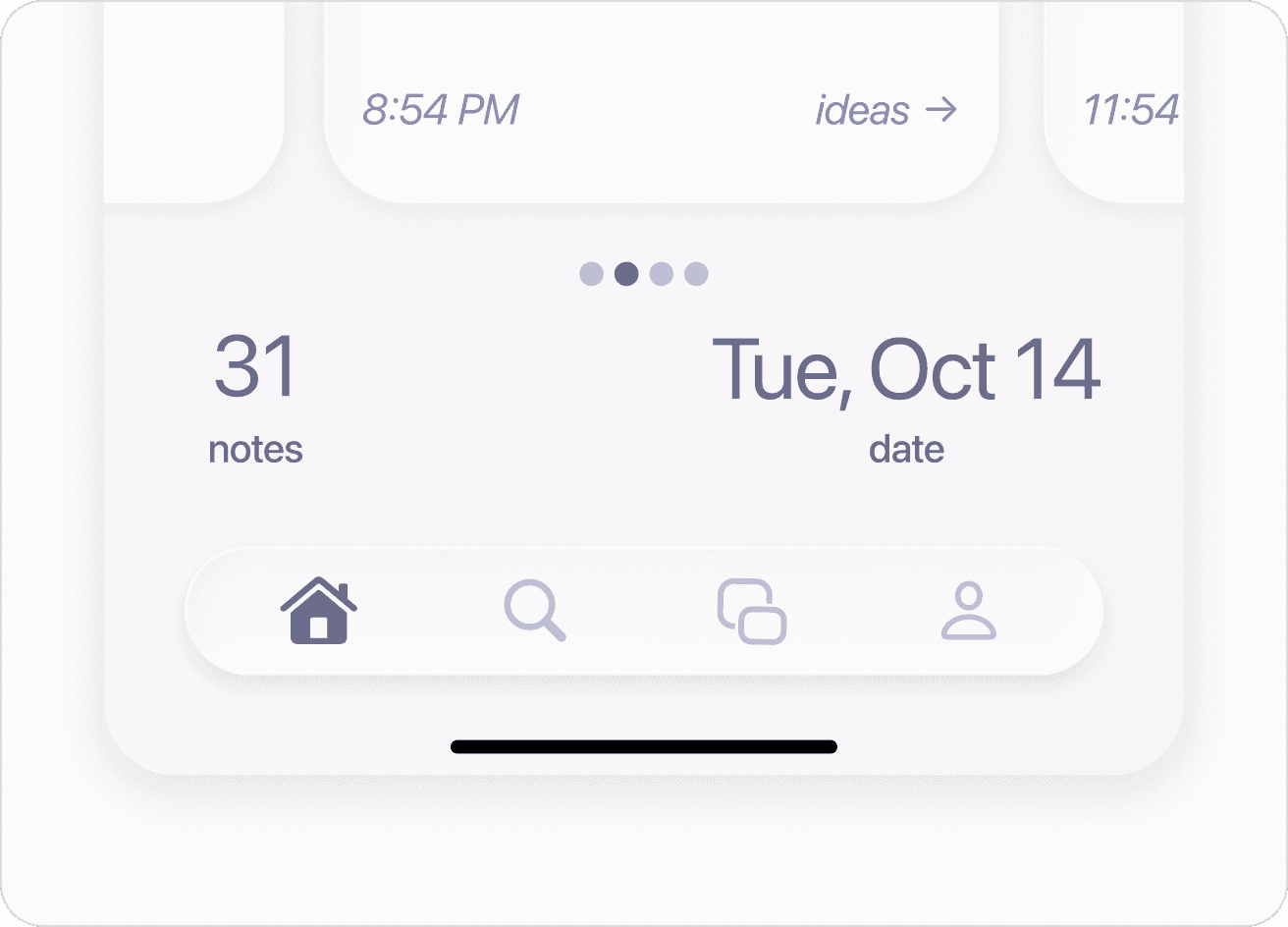
Date Tracking
Date Tracking
Users can see the date it was written change as they scroll
Users can see the date it was written change as they scroll
Users can see the date it was written change as they scroll
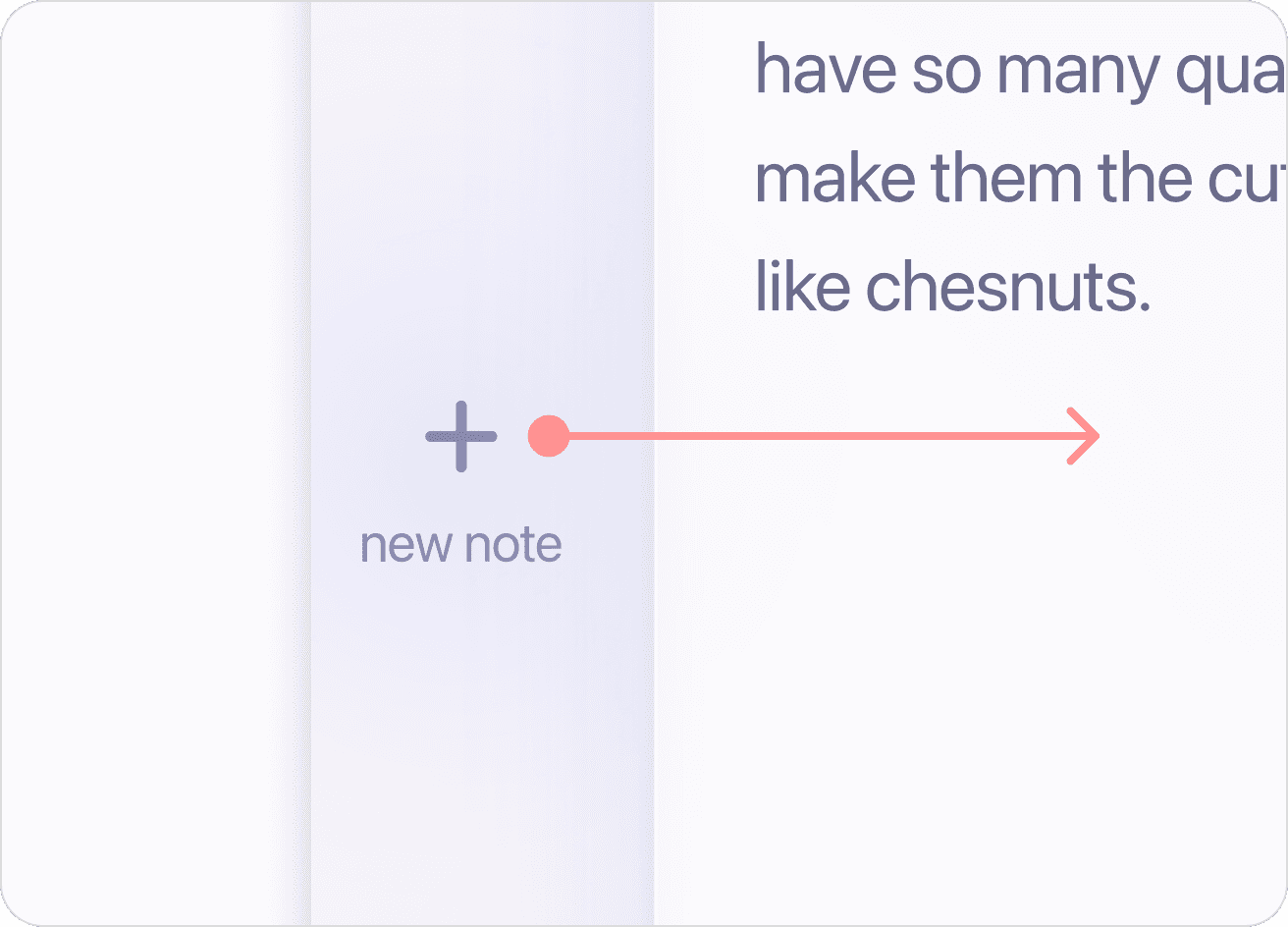
Slide for a New Note
Slide for a New Note
Interaction detail: Slide to easily add a new note after writing one
Interaction detail: Slide to easily add a new note after writing one
Interaction detail: Slide to easily add a new note after writing one
AI Semantic Search
AI Semantic Search
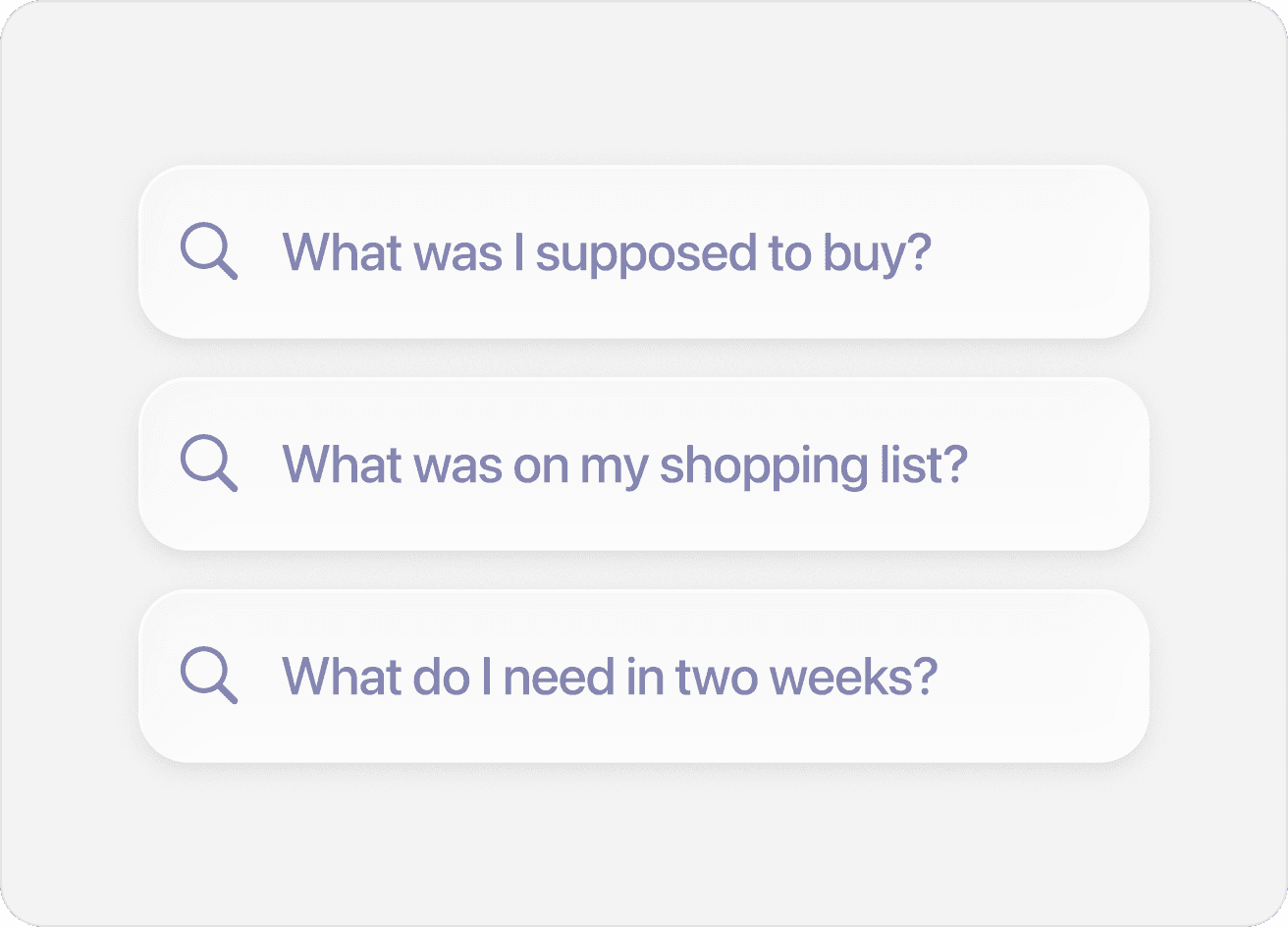
Suggested Searches
Suggested Searches
Personalized suggestions based on onboarding + AI + patterns
Personalized suggestions based on onboarding + AI + patterns
Personalized suggestions based on onboarding + AI + patterns
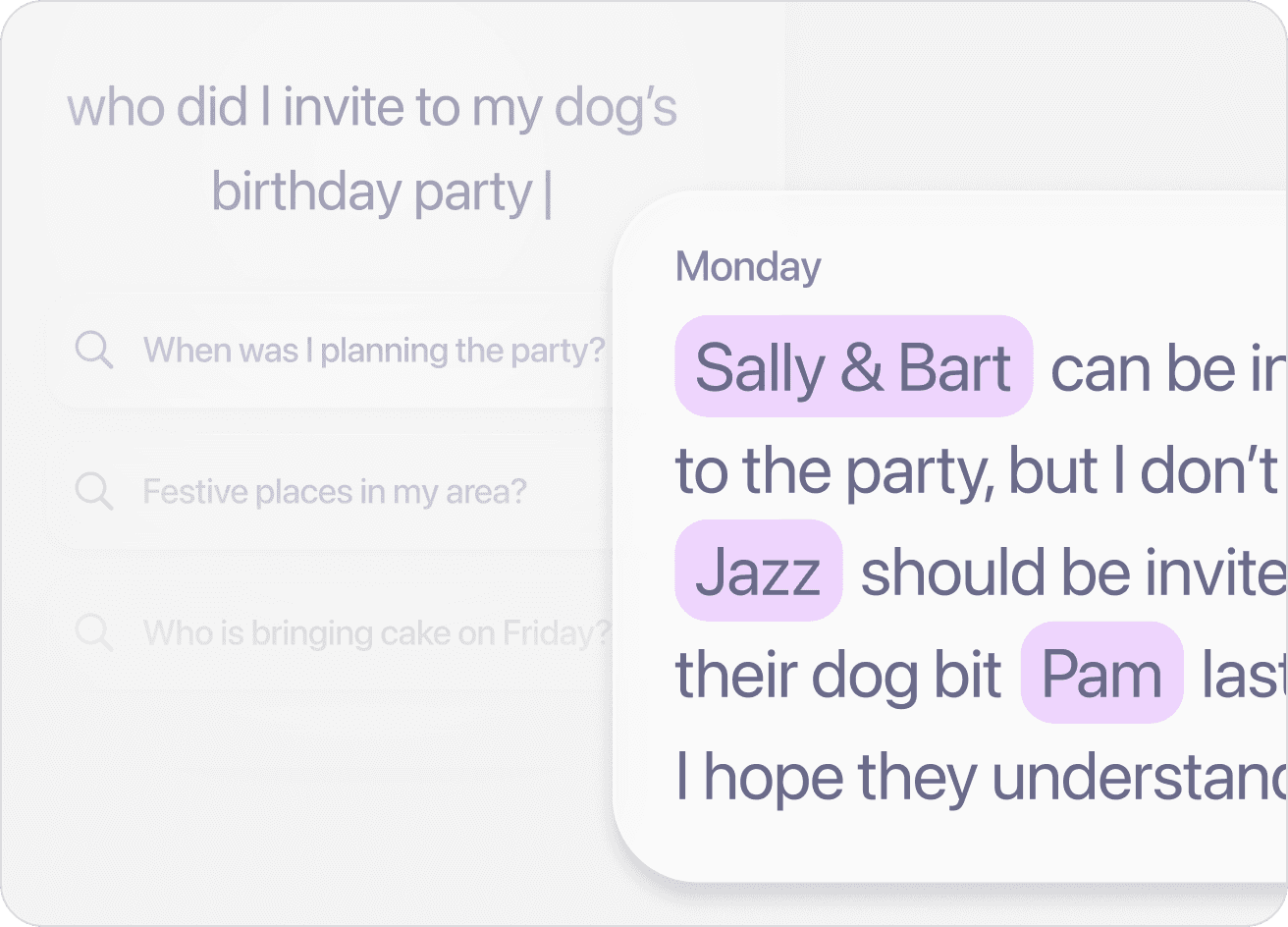
Semantic Search
Semantic Search
Context based search made possible with AI
Context based search made possible with AI
Context based search made possible with AI
AI Categorization
AI Categorization
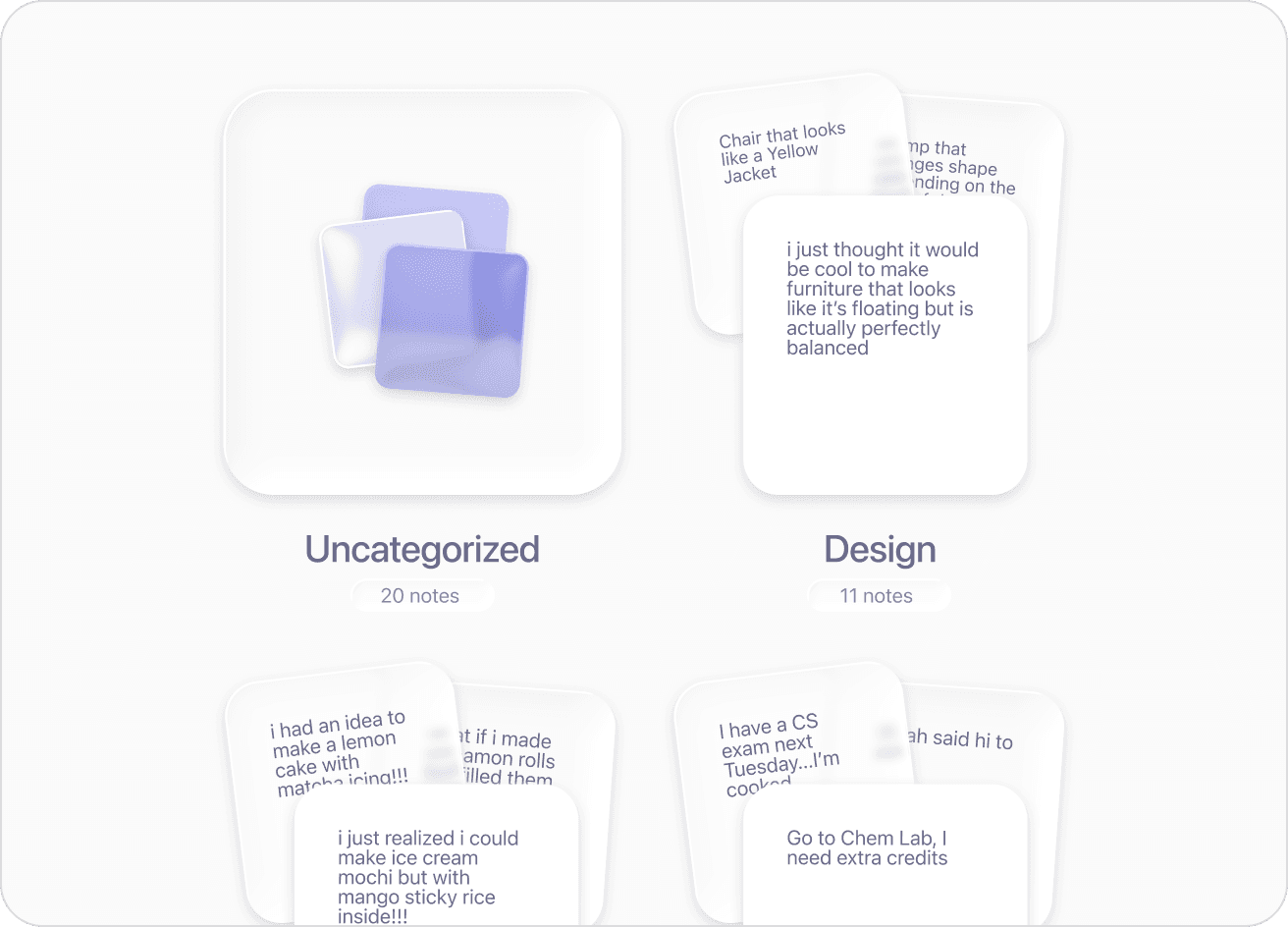
Automatic Categorization
Automatic Categorization
AI categorizes notes based on questions filled in onboarding
AI categorizes notes based on questions filled in onboarding
AI categorizes notes based on questions filled in onboarding
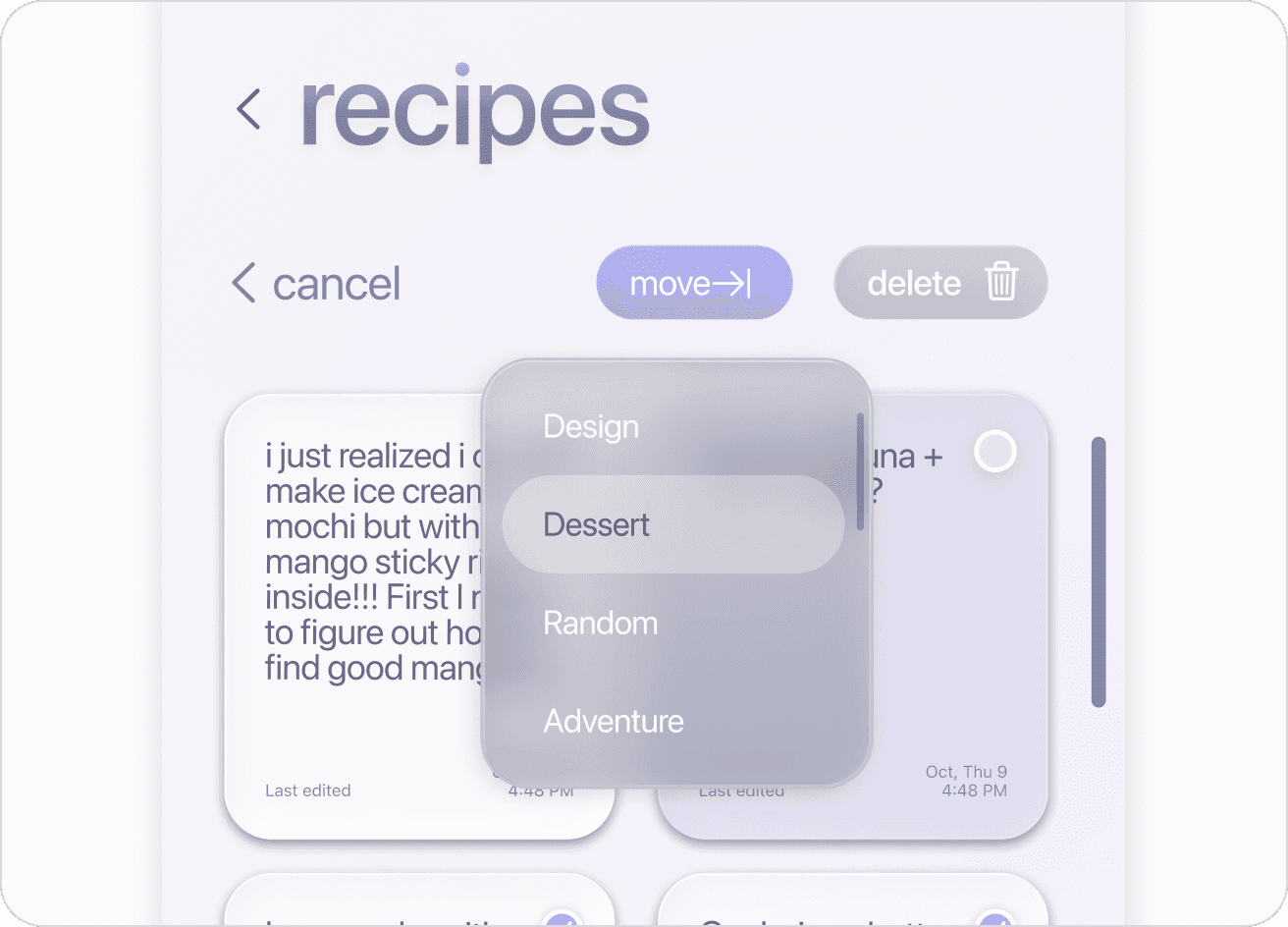
Move Folders
Move Folders
Taking into account AI's possibility of mistakes, users can override manually
Taking into account AI's possibility of mistakes, users can override manually
Taking into account AI's possibility of mistakes, users can override manually
Visualization
Visualization
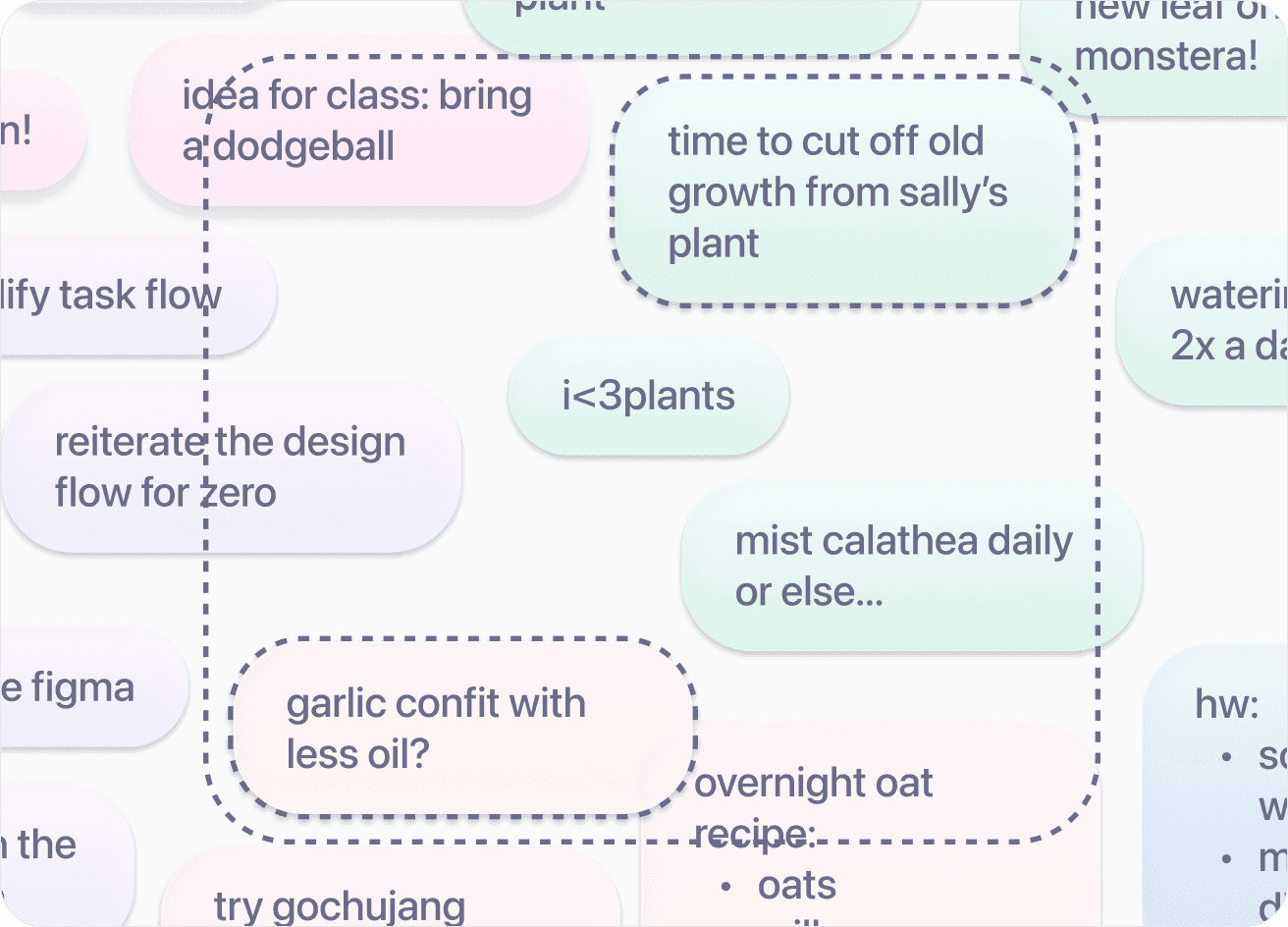
Screenshot Sharing
Screenshot Sharing
Notes are color coded by AI category, select two notes to create a screenshot
Notes are color coded by AI category, select two notes to create a screenshot
Notes are color coded by AI category, select two notes to create a screenshot

Multiple Entry Points
Multiple Entry Points
To increase retention of the visualization feature
To increase retention of the visualization feature
To increase retention of the visualization feature
5 Designers + 20 Developers
5 Designers + 20 Developers
5 Designers + 20 Developers
Developer Handoff
Developer Handoff
How can we collaborate with devs to build?
How can we collaborate with devs to build?
How can we collaborate with devs to build?
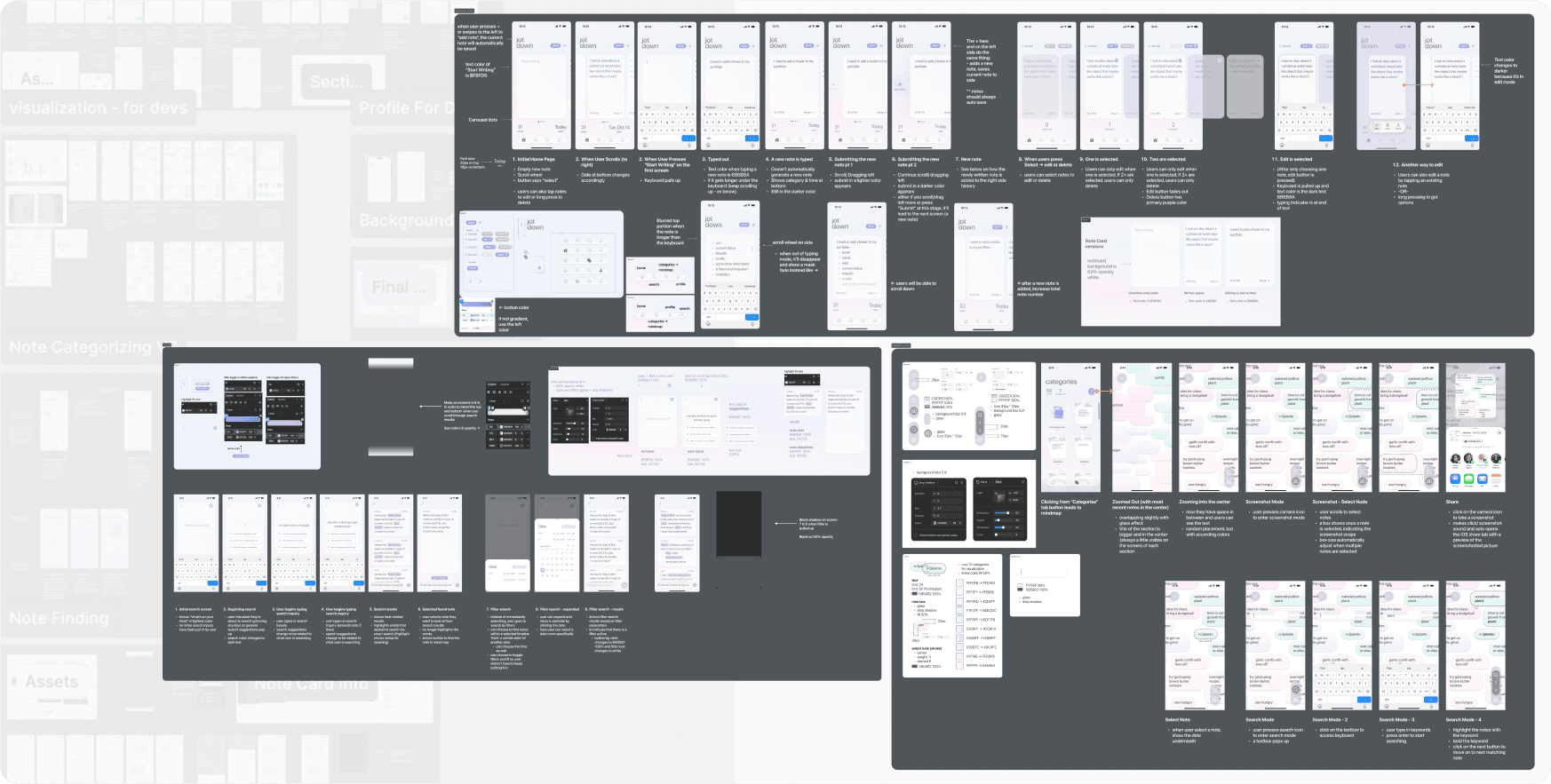
Detailed and Technical
Detailed and Technical
Detailed and Technical
Each screen is thoroughly described - annotating specific interactions, padding, and detailed color choices. We also built a design component system to be easily implemented.
Thorough cross-functional collaboration until details were finalized.
Each screen is thoroughly described - annotating specific interactions, padding, and detailed color choices. We also built a design component system to be easily implemented.
Thorough cross-functional collaboration until details were finalized.
Each screen is thoroughly described - annotating specific interactions, padding, and detailed color choices. We also built a design component system to be easily implemented.
Thorough cross-functional collaboration until details were finalized.
1st Place in Popular App - Crowd Favorite 🏆
1st Place in Popular App - Crowd Favorite 🏆
Voted at the final demo day after our presentation
Voted at the final demo day after our presentation
Voted at the final demo day after our presentation
Final Takeaways
Final Takeaways
Final Takeaways
Leading 4 designers in designing, project planning, and collaboration with developers was an amazing experience. I got to have conversations only designers could have and problem-solve as a team.
It also strengthened my ability to collaborate with developers - team members who think completely differently! It was incredible to see a working output from their codes.
Key Learnings:
Leadership & Teamwork
Designing for AI integration
Tradeoffs & Iterations
Engineering + Design
Leading 4 designers in designing, project planning, and collaboration with developers was an amazing experience. I got to have conversations only designers could have and problem-solve as a team.
It also strengthened my ability to collaborate with developers - team members who think completely differently! It was incredible to see a working output from their codes.
Key Learnings:
Leadership & Teamwork
Designing for AI integration
Tradeoffs & Iterations
Engineering + Design
Leading 4 designers in designing, project planning, and collaboration with developers was an amazing experience. I got to have conversations only designers could have and problem-solve as a team.
It also strengthened my ability to collaborate with developers - team members who think completely differently! It was incredible to see a working output from their codes.
Key Learnings:
Leadership & Teamwork
Designing for AI integration
Tradeoffs & Iterations
Engineering + Design

Rebecca Kim
@2026 • All Rights Reserved
Currently the VP of Design of iOS Club, founding board of a new design club, and previously a UXD intern at Google.
Rebecca Kim
@2026 • All Rights Reserved
Currently the VP of Design of iOS Club, founding board of a new design club, and previously a UXD intern at Google.
@2026 • All Rights Reserved